Attendance tracking is about more than scanning a few badges. As an event organizer, you become familiar with this once you have to answer the question, "How many people were actually there?"
In 2026, that question is asked in real time, mid-event, from a dashboard on someone's phone, not just after the fact in a spreadsheet.
Organizers are also treating check-in and attendance tracking as a single decision. Platforms are now judged on whether the check-in action itself, a QR scan, a manual name lookup, or a kiosk tap, generates the attendance record instantly, without a separate export/import step.
Trusted attendance data drives accurate reporting to sponsors, clean billing and revenue reconciliation, compliance, and smarter planning for your next event. Whether you run conferences, retreats, or multi-day trainings, attendance data should be defensible and audit-ready from the first scan onward. With clean numbers, reporting is easier and your team can act on the data.
What is event attendance tracking software?
In simple terms, event attendance tracking software is the system you use to confirm who showed up and when.
On a practical level, it helps confirm presence at check-in, prevent duplicate or shared badge entry, track no-shows, record attendance during specific sessions, and maintain accurate logs for reporting and compliance.
Beyond basic check-in, attendance tracking creates a verified, timestamped record tied directly to each registrant. Check-in is the entry point to that system.
Why attendance data gets messy without the right system
Attendance data rarely gets messy on purpose. It gets messy because of process gaps, which lead to these common issues:
- Manual headcounts that don't match registration totals
- Badge sharing between attendees
- Partial check-ins across multi-day programs
- Devices going offline without syncing
- Separate teams running different reports that don't align
At a sports camp, for example, a camper might check in on Day 1 but skip the drills session on Day 2. Without session-level tracking, attendance records become inflated.
At a professional conference offering CE credits, if session scans aren't tied directly to the original registration record, reporting becomes a reconciliation disaster.
Messy data affects revenue, compliance, and long-term planning. Not to mention, your professional reputation will take a hit.
Core features that matter in attendance tracking tools
Not all check-in tools are created equal. If accurate data matters to your event, consider these features essential.
- Real-time check-in synchronization is important when multiple staff members are scanning simultaneously; data needs to update instantly across devices to prevent duplicate entries and ensure everyone sees the same numbers.
- QR code scanning speeds entry and reduces human error, improving the attendee experience.
- Badge scanning and badge printing support are critical for conferences and multi-day events, so what is printed matches what is recorded.
- Offline mode with accurate data syncing is necessary when Wi-Fi fails or a venue is overloaded; the system must work offline and sync correctly once connectivity returns.
- Audit trails with timestamps create defensible records, which are critical for compliance-based events, CE tracking, and sponsor reporting.
- Clean, exportable reporting saves time; attendance data should be easy to export, filter, and share without manual cleanup.
To see RegFox's check-in tools in action, visit the RegFox check-in app feature page.
From check-in to tracking: how each platform connects the dots
Check-in is only useful for reporting when it is tied to a record the moment it happens. If the scan lives in one system and the attendance report lives in another, you go straight back to reconciling spreadsheets. This section outlines, platform by platform, how the check-in action becomes tracked, reportable attendance data, and where each platform's workflow is confirmed or unclear. For a side-by-side look at check-in features, offline capabilities, badge printing, session tracking, and pricing, see our best event check-in apps comparison.
How RegFox's check-in feeds attendance tracking
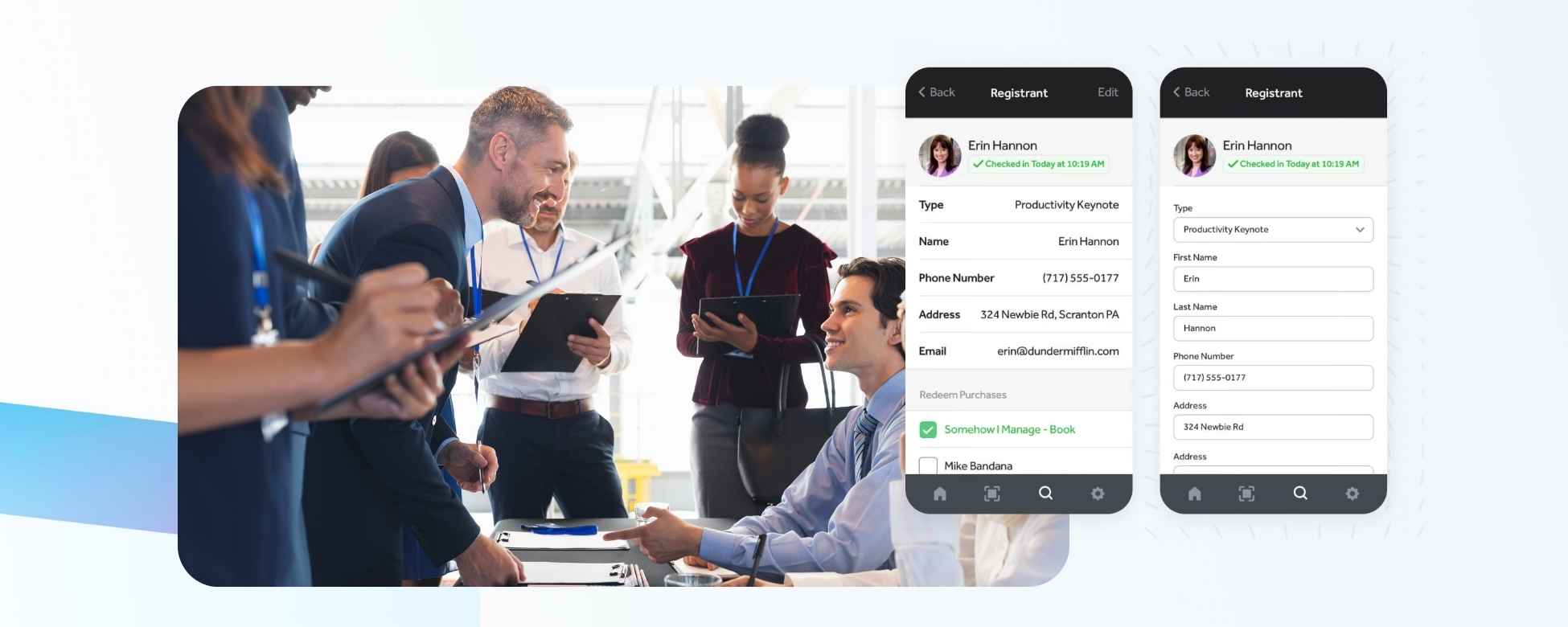
Staff can scan an attendee’s QR code or search by name/email in the RegFox check-in app (iOS and Android). The check-in connects directly to the same registration record created at sign-up, and staff can also check attendees into individual sessions. Connected devices sync with the online database and other check-in devices every 90 seconds, while offline check-ins are stored and synced once the device reconnects.
- QR-code scanning and manual attendee lookup
- Event and session-level check-in
- Multi-device syncing with offline check-in support
- Attendance and check-in history available in reports
How Eventbrite's check-in feeds attendance tracking
Staff scan attendee QR codes in the Eventbrite Organizer app; if a code won't scan, they can look the attendee up manually and check them in by name. The app updates attendance status in real time against the order record.
- QR-based check-in via the Organizer app
- Manual lookup and check-in
- Session-level tracking is limited
How Whova's check-in feeds attendance tracking
Staff check attendees into individual sessions via badge scanning and in-app tools, and organizers can monitor participation and export attendance data. Whova supports session-level check-in, not just front-door entry.
- QR-code scanning and manual name lookup
- Event, day, and session-level check-in
- Attendance tracking and reporting
How Zkipster's check-in feeds attendance tracking
Zkipster is built around the guest list: staff scan or update a guest at the door, and entry status updates instantly across every device running the list. For invitation-only and VIP events, the guest list is the attendance record.
- QR-code and barcode scanning
- Guest-list check-in and status tracking
- Session-level check-in
How Bizzabo's check-in feeds attendance tracking
Bizzabo pairs on-site check-in and badge printing with its enterprise analytics suite, so check-in data feeds the platform's broader event reporting.
- QR-code or name-based check-in
- Event and session check-in
- Badge printing
- Onsite reporting and analytics
How Cvent's check-in feeds attendance tracking
Cvent's OnArrival app lets staff scan QR codes or barcodes or search attendees by name or email for check-in. Core check-in functions can work offline, while OnArrival Premium adds session check-in and capacity controls. Check-in activity feeds Cvent's attendance and event reporting.
- QR-code, barcode, and manual attendee check-in
- Offline core check-in
- Session check-in and capacity control with OnArrival Premium
- Attendance reporting and analytics
How Eventtia's check-in feeds attendance tracking
Eventtia's check-in tools connect to session tracking and reporting dashboards, so check-in activity is available for review inside the platform.
- QR-based event and session check-in
- Activity and checkpoint access tracking
- Real-time check-in reports and dashboards
How Eventleaf's check-in feeds attendance tracking
Attendees arrive with a QR code on their confirmation email or printed badge; staff scan it or search the attendee's name in the Eventleaf check-in app and check them in with one tap. That check-in is stored in the cloud, and every check-in is logged and visualized in real time on the organizer's dashboard, filterable by room, session, or speaker. Check-in works offline and auto-syncs once connectivity returns, and check-in reports can be pulled.
- QR code scanning (mobile or printed), with QR codes auto-generated for each attendee
- Manual lookup via name search in the app
- Session-level check-in tracking, with check-in reports by session
- Real-time dashboard with check-in activity logged and visualized
How Swoogo's check-in feeds attendance tracking
Staff running Swoogo's Go Onsite app check attendees into the event, a session, or a package using either the attendee's name or their QR code. Go Onsite syncs with Swoogo in real time, so attendance numbers, sliceable by registration type, are visible to the whole team as they happen, and check-in reports can be pulled immediately post-event. Offline check-ins are stored locally and synced when the connection returns. Go Onsite Pro also includes Check-In Planner Alerts for use cases such as notifying team members when a VIP arrives.
- Fast QR code check-in
- Manual lookup by attendee name or QR code
- Session check-in, including on-the-fly check-in for guests not pre-registered for a session
- Real-time attendance tracking and reporting, by registration type and more
Best event attendance tracking software compared
Here's a quick overview of the most popular event attendance tracking software organizers use in 2026.
RegFox
RegFox is built to track attendance as part of a complete registration and on-site workflow, not as a separate add-on tool. Attendance data ties directly to the original registration record, eliminating reconciliation headaches.
Key features: QR-based check-in via the RegFox Check-In App (iOS & Android), native badge printing, breakout session attendance tracking, real-time attendance logs across devices, and exportable, customizable attendance reports.
RegFox’s on-site check-in app works online and offline, syncing across multiple devices and refreshing with recent registrations.
Pros: High accuracy, unified data, scalable for multi-day events.
Cons: May be overkill for simple events, as it’s more powerful than basic check-in apps.
Price: You can choose from Standard, Premium, and Professional tiers, based on the budget and needs of your event.
Eventbrite
Eventbrite provides attendance tracking through its Organizer app, where staff can scan attendee QR codes at entry for check-in. The app updates attendance status in real time and allows manual lookup and check-in if needed.
Key features: QR-based check-in, mobile scanning, basic reporting.
Pros: Simple setup and familiar interface for many organizers, event discovery available.
Cons: Fees add up for higher cost events, limited advanced session-level tracking.
Price: U.S. paid tickets have a 3.7% + $1.79 service fee per ticket, plus a 2.9% payment processing fee per order.
Whova
Whova focuses on attendee engagement and event apps. For attendance tracking, it supports session check-ins through badge scanning and in-app tools, which allow organizers to monitor participation and export attendance data.
Key features: Session check-ins, engagement tracking, in-app verification.
Pros: Strong mobile experience and networking tools.
Cons: Pricing is quote-based, making upfront cost comparisons more difficult.
Price: Custom, quote based pricing.
Zkipster
Zkipster specializes in corporate and invitation-only events. For attendance tracking, it uses real-time guest list management and on-site check-in tools, so you can scan and update entry status across devices.
Key features: Guest list management, on-site check-in, VIP tracking.
Pros: Ideal for controlled guest lists and high-touch events.
Cons: Not built for large public, multi-day conferences.
Price: Essentials starts at $246/month billed annually ($2,950/year). Professional starts at $408/month billed annually ($4,900/year). Enterprise pricing is custom.
Bizzabo
Bizzabo serves enterprise-level conferences and corporate events.
Key features: On-site check-in, advanced analytics, badge printing.
Pros: Strong enterprise reporting capabilities.
Cons: Custom pricing and an enterprise-focused feature set can make it more than smaller event teams need.
Price: Starts at $17,999 per year, billed annually, with a three-user minimum.
Cvent
Cvent provides a comprehensive enterprise event suite.
Key features: On-site solutions, session scanning, detailed analytics.
Pros: Full-scale enterprise event management.
Cons: Quote-based pricing and a broad enterprise feature set can make it harder for smaller teams to evaluate upfront.
Price: Custom, quote-based pricing.
Eventtia
Eventtia offers an all-in-one event platform for mid-sized events.
Key features: Check-in tools, session tracking, reporting dashboards.
Pros: Balanced feature set for growing events.
Cons: Its 12-month licensing model may be a larger commitment for smaller or one-off events.
Price: Essential starts at $1,650/year for 250 attendees. Premium starts at $2,500/year, and Networking starts at $3,500/year at the same attendee level.
Eventleaf
Eventleaf pairs registration and badge printing with a check-in app that logs attendance in real time, including at the session level, a combination usually reserved for pricier enterprise tools.
Key features: QR code and barcode badge scanning at check-in, staff-assisted check-in via name search, offline check-in with automatic sync, session-level check-in tracking with per-session reports, real-time check-in dashboard and reports, on-site badge printing and self-service kiosk mode.
Pros: Strong session-level tracking and real-time reporting at a lower price point than enterprise suites, with per-attendee pricing on the Professional and Ultimate tiers.
Cons: The on-site check-in app and badge printing are gated to the Professional and Ultimate plans; the free Starter and Basic tiers cover registration and badge design but not on-site check-in via the app.
Price: Starter is free for up to 100 attendees per year. Basic starts at $500/year for 500 attendees ($1 per attendee), Professional starts at $2,000/year for 1,000 attendees ($2 per attendee), and Ultimate is custom-priced.
Swoogo
Swoogo's Go Onsite app handles event, session, and package check-in by QR code or attendee name, and syncs with the core Swoogo platform in real time, where attendance data connects to custom reporting and CRM integrations.
Key features: Fast QR code or name-based check-in via the Go Onsite app, session and package check-in including on-the-spot check-in for non-pre-registered guests, offline check-in with sync-on-reconnect, on-demand badge printing with per-registration-type badge designs, real-time attendance analytics sliceable by registration type, Check-In Planner Alerts for VIP arrivals, and self-serve kiosk mode (Go Onsite Pro).
Pros: The core Go Onsite check-in app is included with Swoogo plans, and attendance data connects with Swoogo's reporting and integrations.
Cons: Some features, including Kiosk Mode, are gated to the Go Onsite Pro add-on rather than the base app.
Price: Professional starts at $11,800/year for one Full User and one Reporting User, with unlimited events and registrations. Enterprise pricing is available through sales.
What makes RegFox the best choice for clean attendance data
With RegFox, registration and attendance live inside the same system. That means no exporting from one tool to upload into another, no mismatched attendee IDs, no duplicate records across platforms, and no manual reconciliation before reporting.
Attendance logs, session scans, upgrades, modifications, and payment history are all tied to the same attendee profile. When it's time to report final numbers, exports and reports keep the data easy to access and share. For events that require defensible data (camps tracking minors, conferences issuing CE credits, or organizations reporting to sponsors) that level of confidence matters.
How to choose the right attendance tracking tool for your event
As you evaluate options, consider these questions:
- How many attendees will you manage?
- Do you need multi-day or session-level tracking?
- Are CE credits or compliance reports required?
- Will multiple staff devices scan simultaneously?
- Do you need offline capability?
- Do registration and attendance need to be reconciled automatically?
- Does check-in update your dashboard in real time or only after manual export?
- How detailed do your exports and audit logs need to be?
If your event is growing, your attendance tracking system should scale with it.
FAQs
What is event attendance tracking software used for?
It verifies and records who attends an event or session, creating accurate logs for reporting, billing, compliance, and future planning.
How do event attendance tools keep counts accurate?
By using QR scanning, badge verification, real-time syncing, and timestamped audit logs tied directly to each registrant.
What is the best event attendance tracking software for large events?
For large or multi-day events, platforms that unify registration and attendance, like RegFox, Cvent, or Bizzabo, offer stronger reconciliation and reporting.
How does attendance tracking differ from basic check-in?
Basic check-in confirms entry. Attendance tracking records detailed session participation, timestamps, and maintains audit-ready records.
Can attendance tracking work across multiple sessions or days?
Yes. Advanced systems track attendance per session, per day, and across multi-day programs.
How does check-in data become attendance tracking data?
On modern platforms, the QR scan or manual lookup at the door writes directly to the attendee's record the moment it happens. There's no separate export/import step: the check-in is the attendance record, which enables real-time dashboards and clean post-event reports. See the check-in-to-tracking breakdown above for how each platform handles this.
Can attendees be checked in manually if their QR code won't scan?
Yes. RegFox, Eventbrite, Whova, zkipster, Bizzabo, Cvent, Eventleaf, and Swoogo all publicly document manual or name-based attendee lookup alongside scan-based check-in. A manual fallback is useful when a QR code is damaged, inaccessible, or unavailable.
Do check-in tools track attendance at the session level, or just event entry?
It varies by platform. RegFox, Whova, zkipster, Bizzabo, Cvent, Eventtia, Eventleaf, and Swoogo all publicly document session-level check-in or attendance tracking. Eventbrite’s current Organizer app documentation focuses primarily on event or date/time check-in. If you issue CE credits or need per-room attendance data, confirm session-level tracking before choosing a platform.
Get started with RegFox for attendance tracking
If you need attendance data that is clean, accurate, and ready for reporting, RegFox was built for that.
From QR-based check-in to session tracking and exportable reports, attendance data stays unified from start to finish.
If you're ready to gain full confidence in your attendance numbers, create your free RegFox account and start building today. We’re here to help you host your best event yet.
– The RegFox team