The check-in experience sets the tone for your entire event. A sluggish line or a mismatched badge doesn't just frustrate attendees, it erodes trust in your organization before the first session even starts. The right event check-in app eliminates bottlenecks, keeps your data accurate, and gives your team real-time visibility into who's on-site.
But with so many platforms on the market, choosing the right one means weighing trade-offs in pricing, offline reliability, badge support, and scalability. This ranked comparison breaks down seven of the most widely used event check-in apps in 2026, starting with RegFox: the only platform on this list offering true pay-as-you-go pricing instead of locking organizers into annual subscriptions.
Here's a closer look at how each platform performs on event day and where it fits best.
RegFox
RegFox sets itself apart because registration, check-in, and attendance tracking all live in a single unified system. There's no need to export data from a registration tool into a separate check-in app, which means no mismatched records and no reconciliation headaches when it's time to report final numbers.
How It Works
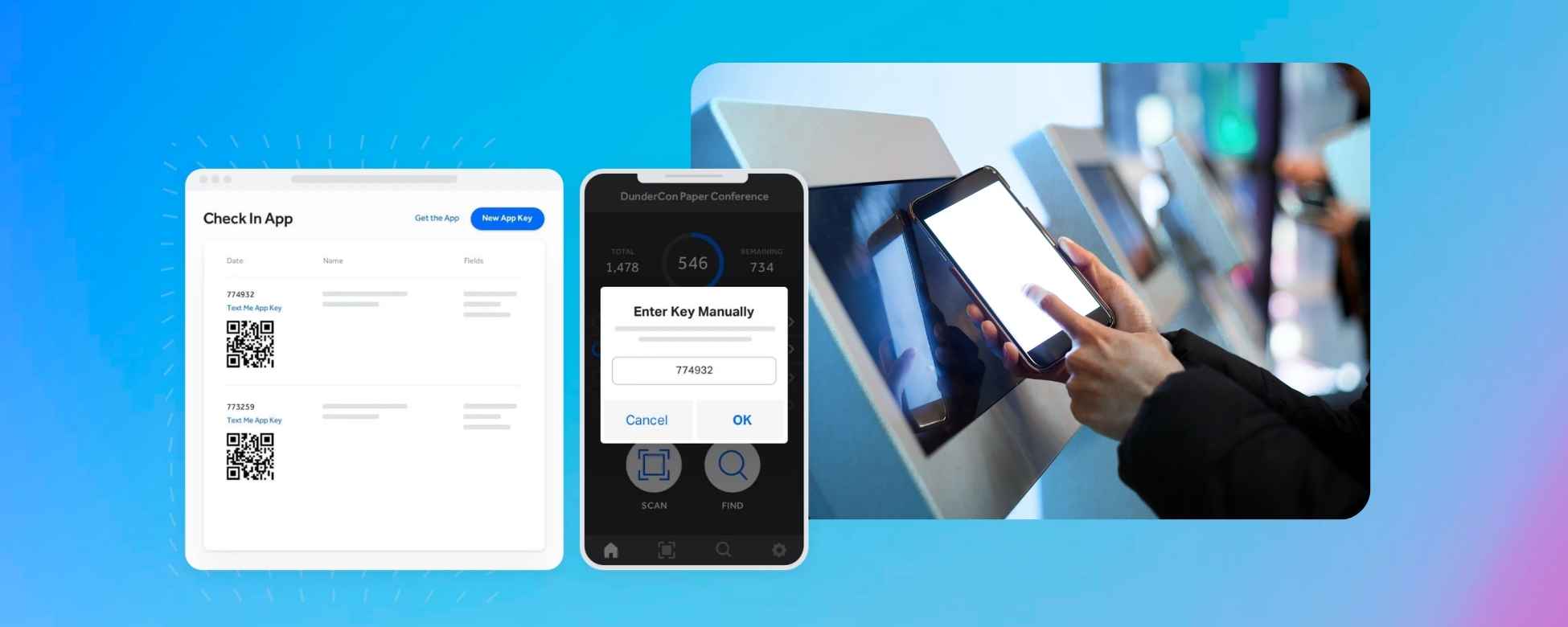
Your team downloads the RegFox check-in app on any iOS or Android device. Once logged in, the app pulls your full registrant list (including recent sign-ups) and is ready to scan. Staff members tap to scan a registrant's QR code, and the attendee is instantly marked as checked in across every connected device in real time. If an attendee doesn't have their QR code handy, your team can use manual name lookup to find and check them in within seconds.
For events that need on-site badges, RegFox offers native badge printing that ties directly to the registration record. Badges print on demand at check-in, so there's no pre-printing waste and no alphabetical table for attendees to sort through. The app also supports app key sharing, which lets you grant check-in access to volunteers or additional staff without sharing your full admin credentials.
RegFox's offline reliability is a clear advantage. Whether your venue loses Wi-Fi or you're running an outdoor event with little or no connectivity, the check-in app continues working. Every scan is stored locally and syncs automatically once the device reconnects. Capacity tracking is built in as well, giving organizers a live view of how many attendees have arrived versus how many are registered.
Because registration and attendance data share the same record, reporting is clean from the start. Session-level tracking, timestamped audit logs, and exportable reports are all available without manual cleanup, which is a critical advantage for events issuing CE credits or reporting to sponsors.
For a deeper look at why unified attendance data matters, see our guide on event attendance tracking tools that keep numbers clean and clear.
RegFox uses pay-as-you-go pricing so you only pay for the events you run.
➕ Pros: Unified registration and check-in data, strong offline mode, on-demand badge printing, scalable for multi-day events, pay-as-you-go pricing (no subscription lock-in).
➖ Cons: Feature depth may exceed what's needed for very simple, single-session events.
💲 Price: Pay-as-you-go across Standard, Premium, and Professional tiers. You pay based on the event you're running, not a recurring annual contract.
Eventbrite
Eventbrite is one of the most recognizable names in event ticketing, and its Organizer app provides a straightforward check-in experience that works well for general admission events.
How It Works
Organizers use the Eventbrite Organizer app to scan attendee QR codes at the door. The app updates attendance status in real time and allows manual name search if a guest can't produce their code. Multiple devices can scan simultaneously, and the dashboard reflects updated counts as attendees arrive.
Badge integration, however, is limited. Eventbrite is primarily a ticketing platform, so organizers needing printed name badges typically rely on third-party tools or manual processes. Offline functionality exists but is partial. The app can scan previously downloaded attendee lists, though syncing can lag when connectivity is intermittent.
Eventbrite's strength is its built-in event discovery marketplace, which helps drive ticket sales for public-facing events. For organizers whose priority is selling tickets and managing a simple door scan, it gets the job done.
➕ Pros: Familiar interface, strong event discovery, simple setup for general admission.
➖ Cons: Limited badge support, fees scale with ticket price, minimal session-level tracking.
💲 Price: 3.7% + $1.79 per ticket as a service fee.
Cvent
Cvent is an enterprise-grade event management suite used widely by large corporations, associations, and convention-scale organizers. Its on-site solutions module includes robust check-in and badge printing capabilities.
How It Works
Cvent's OnArrival app supports QR code scanning, NFC-enabled badge taps, and manual attendee lookup. At large conferences, Cvent typically deploys dedicated kiosk stations where attendees scan a confirmation code, verify their details on screen, and receive a printed badge. The system supports session-level scanning, so organizers can track attendance across breakout rooms and workshops.
The platform's analytics engine is powerful, offering real-time dashboards and post-event reporting that enterprise stakeholders expect. Offline mode is supported, and the system is designed to handle thousands of simultaneous check-ins.
The trade-off is complexity and cost. Cvent requires significant setup, often involves dedicated onboarding, and its pricing is custom-quoted, typically as an annual subscription that bundles registration, check-in, and other modules together.
➕ Pros: Enterprise-scale reliability, NFC support, deep analytics, session scanning.
➖ Cons: Expensive, complex setup, often more than mid-sized organizers need.
💲 Price: Custom, quote-based subscription pricing.
Whova
Whova has built a strong reputation around attendee engagement with networking features, in-app messaging, and agenda building. Its check-in tools are part of a broader event app experience.
How It Works
Organizers can check attendees in by scanning QR codes or using badge scans tied to the Whova event app. The platform supports session-level check-ins, allowing organizers to verify attendance at individual workshops or talks. Attendees can also self-check-in through the app in some configurations, reducing the burden on staff.
Whova's engagement tracking monitors session participation, poll responses, and networking activity, which can be useful for demonstrating event ROI to stakeholders.
However, Whova is often layered on top of a separate registration system, which can fragment data. If your registrations live in one platform and your check-ins live in Whova, reconciliation requires extra steps. Offline support is limited compared to platforms with dedicated offline-first architecture.
➕ Pros: Excellent attendee engagement tools, session check-ins, networking features.
➖ Cons: Often requires a separate registration platform, limited offline mode, can fragment attendance data.
💲 Price: Custom, quote-based pricing.
Zkipster
Zkipster is purpose-built for invitation-only, corporate, and high-touch events. Think product launches, galas, and VIP experiences where guest list control is top priority.
How It Works
Your team loads a curated guest list into Zkipster, and check-in happens via QR code scanning or manual name search on a tablet. The interface is clean and fast, designed for scenarios where a host or greeter is personally welcoming each guest. Real-time guest list updates sync across all devices, so if a VIP is added at the last minute, every check-in point reflects the change immediately.
Zkipster includes native badge printing and supports capacity tracking, giving organizers a live count of arrivals versus expected guests. The platform also offers walk-in management for unregistered guests who need to be added on the spot.
Where Zkipster falls short is scale. It's not designed for large public conferences or multi-day programs with complex session tracks. It excels in controlled, curated environments.
➕ Pros: Elegant guest list management, real-time sync, strong VIP and walk-in handling.
➖ Cons: Not built for large-scale or multi-session events, subscription pricing.
💲 Price: Subscription-based plans. See the Zkipster pricing page for current tiers.
Bizzabo
Bizzabo targets mid-to-large enterprise conferences and corporate events, offering a polished on-site experience alongside marketing and analytics tools.
How It Works
Bizzabo's check-in system supports QR scanning, NFC badge taps, and manual lookup. Organizers can deploy self-service kiosks or staff-assisted check-in stations, and the platform prints badges on demand at the point of entry. Real-time dashboards show arrival rates, no-show counts, and session attendance.
The platform's strength lies in connecting check-in data with broader event marketing analytics, tracking the attendee journey from email open to registration to on-site arrival. For enterprise marketing teams, this visibility is a significant draw.
Bizzabo's pricing reflects its enterprise positioning. It's custom-quoted based on an organization’s event program and onsite requirements, which can be a barrier for smaller organizations or one-off events.
➕ Pros: Strong enterprise analytics, NFC and QR support, on-demand badge printing, marketing integration.
➖ Cons: Higher cost, annual contracts, complexity may exceed needs of smaller events.
💲 Price: Custom pricing. Visit the Bizzabo pricing page to request a quote.
Eventleaf
Eventleaf offers an accessible event management platform with built-in check-in and badge printing, positioned as a budget-friendly option for small to mid-sized events.
How It Works
Attendees receive QR codes upon registration, which staff scan using the Eventleaf app or a connected barcode scanner. The platform supports on-demand badge printing with customizable templates, and organizers can track check-in counts in real time through the dashboard. Manual name lookup is available as a fallback.
Eventleaf offers a free tier for smaller events, making it an approachable entry point for organizers who are just getting started with digital check-in. Paid plans unlock additional features like custom branding and higher attendee limits.
Eventleaf supports offline check-in, session tracking, reporting, and onsite badge printing. The bigger consideration is its plan structure and annual attendee minimums compared with RegFox’s pay-as-you-go model.
➕ Pros: Free tier available, simple badge printing, low barrier to entry.
➖ Cons: Limited offline mode, less robust reporting, fewer advanced features at scale.
💲 Price: Free tier for small events; paid subscription plans available. See the Eventleaf pricing page for details.
How to Choose the Right Event Check-In App
The best check-in app for your event depends on three practical factors that have nothing to do with feature lists and everything to do with your actual event day.
Match the App to Your Event
A 50-person workshop has fundamentally different needs than a 5,000-attendee conference with 40 breakout sessions.
For smaller, single-track events, a simple QR scanning app like Eventbrite or Eventleaf may be sufficient. For multi-day programs with session-level tracking, CE credit requirements, or sponsor reporting obligations, you need a platform where check-in data ties directly to registration, which is where RegFox, Cvent, and Bizzabo deliver.
Ask yourself:
👉 Will you track attendance at individual sessions, or just the front door?
👉 Do you need to report verified attendance numbers to sponsors, boards, or accreditation bodies?
👉 Are you managing a single event or a recurring series?
Connectivity and Venue Constraints
Not every venue has reliable Wi-Fi, and even venues that do can buckle under the load of hundreds of devices connecting simultaneously. If your event takes place outdoors, in a convention center with spotty coverage, or at a camp or retreat facility, offline capability isn't a nice-to-have. It's essential.
RegFox, Cvent, Zkipster, and Bizzabo all offer offline check-in modes, but the depth of that support varies. RegFox's app stores all scan data locally and syncs automatically when connectivity returns, making it a strong choice for unpredictable environments.
Hardware and Staffing Requirements
Some platforms require dedicated kiosk hardware, thermal badge printers, or NFC readers. Others run entirely on smartphones your team already owns. Consider what equipment you'll need to purchase or rent, and whether your volunteers can be trained on the system quickly.
RegFox's app key sharing feature is worth noting here. It lets you grant check-in access to volunteers without exposing your full admin account, which simplifies staffing for events that rely on temporary help.
A quick decision framework:
• Best for connected registration and pay-as-you-go flexibility: RegFox
• Best for ticket discovery: Eventbrite
• Best for enterprise-scale operations: Cvent or Bizzabo
• Best for attendee engagement: Whova
• Best for VIP events: Zkipster
• Best budget entry point: Eventleaf
FAQs
What is an event check-in app?
An event check-in app is a mobile or tablet-based tool that allows organizers to verify attendee arrival using QR code scanning, NFC, or manual name lookup. It replaces paper lists with a digital system that records check-in timestamps, syncs across devices, and feeds directly into attendance reports.
Can event check-in apps work without Wi-Fi?
Some can. Platforms such as RegFox and Cvent offer full offline check-in modes that store scan data locally and sync once connectivity is restored. Others offer only partial offline support, which can lead to gaps in your data if the connection drops at a critical moment.
What's the difference between check-in and attendance tracking?
Check-in confirms that someone arrived at your event. Attendance tracking records session-level participation, maintains timestamped audit logs, and creates defensible records for compliance, CE credits, or sponsor reporting.
Do I need special hardware for event check-in?
Not necessarily. Many apps run on standard iOS and Android devices. However, if you need on-demand badge printing, you'll want a compatible thermal printer. NFC-based check-in requires NFC-enabled badges or wristbands and compatible readers.
Which event check-in app is best for multi-day events?
For multi-day events with session tracking, RegFox offers a strong combination of unified registration data, offline reliability, and session-level attendance logs, all without requiring an annual subscription.
Get Started With RegFox
If your event demands check-in data that's accurate, audit-ready, and connected to every registration record from the start, RegFox was built for exactly that.
From QR-based scanning and on-demand badge printing to offline reliability and session-level tracking, everything stays unified in one system with no reconciliation required.
Ready to create a faster check-in experience? Sign up today or reach out to our support team with questions. We're here to help you run your best event yet.
— The RegFox team




.jpeg)