The check-in experience sets the tone for your entire event.
If attendees are stuck in long lines, unsure where to go, or waiting while staff scrolls through spreadsheets, the negative impact is immediate. It creates stress before the event even begins. On the other hand, a fast and organized check-in builds momentum and reassures attendees they’re in the right place and that the event is well run.
Whether you're hosting an all-day conference or a multi-day retreat, the arrival experience shapes how attendees feel walking in.
The right event check-in software helps your team stay coordinated, reduces confusion on-site, and creates a better first impression from the moment guests arrive.
What Event Check-In Software Does
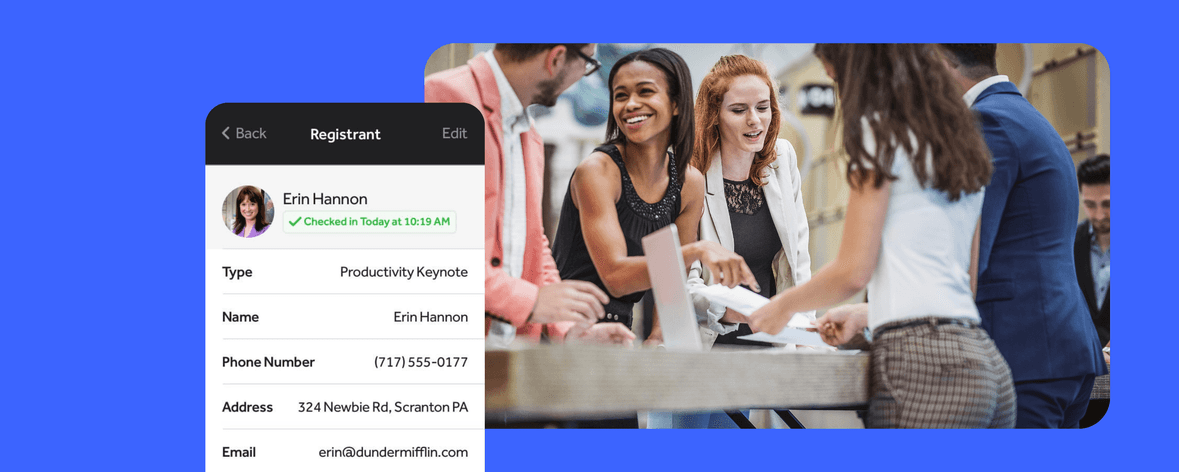
Event check-in software is the system your team uses on-site to verify registrations and manage attendee entry.
Instead of relying on printed lists or manual lookups, it gives your staff a faster way to confirm attendance and track who has arrived in real time. This is especially valuable for high-volume events like conferences or retreats, where attendee lists are long and often include different registration types.
Event check-in software also acts as a shared control center for your team. Everyone working check-in sees the same information at the same time, which helps prevent duplicate check-ins, missed attendees, or conflicting answers at the front of the line. As your event grows, this kind of coordination becomes essential.
What to Look for in the Best Event Check-In Software
Not all check-in tools are designed for the realities of event day. What works in theory doesn’t always hold up when hundreds of people arrive at once.
Fast Attendee Search and Verification
At a busy conference or seminar, even a few extra seconds per attendee adds up quickly. If staff have to pause, scroll, or second-guess what they’re seeing, the line slows down noticeably.
The best check-in tools make verification feel instant. Staff can scan a QR code or search by name and move on without breaking their rhythm. When that process is smooth, everything else flows more naturally.
Mobile and On-Site Flexibility
Check-in rarely happens exactly how you planned it. A retreat might have guests arriving early while rooms are still being prepared, and a workshop might have attendees trickling in right as the session begins.
Your check-in system should support that kind of movement and variation. When staff can use phones or tablets anywhere on-site, it allows you to adjust in real time instead of forcing everyone through a single entrance.
Real-Time Updates Across the Team
Alignment across your team is especially important for larger conferences, seminars, or multi-room events where attendees are moving between spaces. Think of the confusion that ensues when staff members check in attendees at different doors, working off slightly different information.
Real-time syncing solves duplicate and misalignment issues by keeping everyone on the same page. As soon as someone is checked in, that status updates across all devices.
Easy Staff Training and Usability
On event day, your team needs to move with confidence. A clean, simple interface allows volunteers, assistants, and part-time staff to get up to speed quickly so they can focus on helping attendees instead of figuring out the tool. When staff feel confident, the entire check-in experience becomes faster and more consistent.
Reliability Under Pressure
Check-in tools are put to the test when the lines are the longest. It’s the surge right before the conference keynote or the wave of campers clustering at their arrival window that puts pressure on your system.
Your software needs to handle that volume without a lag or crash. A reliable system keeps things steady even when the pace picks up, which allows your team to stay focused instead of troubleshooting.
Tips for a Better Attendee Check-in Experience
Even the best software won’t fix a poorly planned check-in setup. The experience is shaped just as much by your operations as your tools.
Plan Your Check-In Area Layout for Faster Entry
A clear, intentional layout can dramatically improve flow. Attendees should be able to understand where to go without asking for help. That means thinking through entrance placement, signage, and how lines will form and move. For larger events, it can also help to create separate lanes for VIPs, speakers, or different registration levels. When your layout supports the process, your software can do its job more effectively.
Make Sure You Have Enough Staff at the Right Time
Check-in demand tends to come in waves. Planning for these spikes and placing staff where they are most needed can make a noticeable difference.
Rather than simply staffing more people, you want to have the right people in the right roles, and the right places, including someone available to handle issues without slowing down the main line.
Rehearse Your Check-In Process and Double Check Everything
A short pre-event walkthrough can prevent major delays, especially for more complex events like multi-day conferences or retreats with multiple check-in points.
Before attendees arrive, take time to walk through the full process with your team:
✅ Confirm all devices are charged, updated, and ready
✅ Test the internet or connectivity in the actual check-in area
✅ Assign clear staff roles and responsibilities
✅ Practice attendee lookup and QR code scanning
✅ Review how badges, materials, or wristbands will be distributed
✅ Walk through common issues like missing registrations or name mismatches
✅ Create a simple backup plan in case something goes wrong
Pro tip: Even 15–20 minutes of preparation now can prevent hours of delay later.
Send Attendees Clear Instructions Before They Arrive
A smooth check-in starts before the event. When attendees know exactly where to go, what to bring, and what to expect, they arrive prepared. This is especially helpful for retreats, camps, or conferences where arrival logistics may be more complex than a simple walk-in event.
Even simple reminders, to have a QR code ready or arriving within a certain time window, can significantly reduce friction.
Set Up a Dedicated Support Desk for Issues
Even with meticulous planning, it’s inevitable that not every check-in will go smoothly. Attendees might want to change sessions at the last minute or have a question about the camp activity. Instead of letting these inevitable hiccups delay your main line, create a separate space for troubleshooting. This allows your primary check-in to keep flowing while still giving attendees the dedicated help they need.
Managing Check-In Data During and After the Event
One of the biggest advantages of digital check-in is the data it provides.
During the event, you can monitor arrival patterns and identify when lines are building. Afterward, you can review turnout, compare registrations to actual attendance, and pinpoint where delays occurred.
For conferences or multi-session seminars, this data can also help you understand which sessions were most attended and when peak traffic occurred. Over time, this insight makes future planning more effective.
When to Upgrade Your Event Check-In Process
Many organizers stick with the same check-in process longer than they should. If your team is feeling the strain on event day, it is often a sign that your current setup is not keeping up with your event’s growth or complexity.
Here are some common signs it’s time to upgrade:
❌ Lines consistently back up at the main entry
❌ Your staff has to rely on workarounds or manual fixes
❌ Attendee issues are slowing down the flow
❌ Limited visibility into who has arrived
❌ Check-in feels stressful every time
❌ Events becoming larger or more complex
❌Your event used to be small but has evolved into something much larger.
How RegFox Helps Organizers Create a Faster Check-In Experience
RegFox is designed to simplify check-in while still supporting the complexity of real events.
It gives your team a clean, easy-to-use system for managing attendee arrivals, whether you are running a small workshop or a large, multi-day conference. The experience stays consistent even as your event grows.
More importantly, it handles the kinds of real-world scenarios that tend to slow teams down.
For example, if you are managing multiple entry points at a conference, RegFox keeps all check-ins synced in real time so attendees are not accidentally scanned twice. Everyone on your team sees the same information, no matter where they are stationed.
It also works well for events with more complex setups, like retreats or multi-session programs, where attendees may have different registration types or selections. Staff can still quickly find and verify each person without slowing down the line.
The result is a check-in experience that feels fast, organized, and predictable. Your team can stay focused on welcoming attendees instead of managing chaos at the door.
FAQs
What is event check-in software?
Event check-in software is a digital tool that helps organizers verify registrations, track arrivals, and manage attendee entry more efficiently than manual methods.
How does an attendee check-in app work?
Staff can search for attendees or scan registrations, instantly confirming entry and updating attendance records in real time.
What features should I look for in check-in software?
Look for fast search, mobile flexibility, real-time syncing, ease of use, and reliability during peak entry times.
How can I speed up event entry?
Use digital check-in tools, optimize your layout, staff appropriately, and communicate clearly with attendees before arrival.
Why is check-in important for attendee experience?
It creates the first impression and sets the tone for the entire event.
How many staff members do I need for check-in?
It depends on event size and arrival patterns, but you should plan for peak entry periods and include support for troubleshooting.
What should I tell attendees before check-in?
Provide clear instructions on where to go, what to bring, and what to expect.
How can RegFox help improve event check-in?
RegFox provides flexible, real-time tools that help teams reduce delays and manage attendee flow more effectively.
Final Takeaways
🔑 Check-in is your first impression and a smooth process builds confidence immediately
🔑 Speed and clarity reduce stress for both staff and attendees
🔑 Layout, staffing, and communication matter just as much as software
🔑 Real-time data helps you improve future events
🔑 The right system turns check-in from a bottleneck into a strength
If you’re ready to create a faster, more organized check-in experience, sign up with RegFox, or reach out to our support team with questions. We’re here to help you host your best event yet.
— The RegFox team