AI Summary
• Event badge printing works best when it connects directly to registration data and check-in, reducing manual exports and outdated attendee records.
• RegFox integrates badge printing with its registrant database and supports on-demand, individual, and bulk badge printing.
• Key badge printing features to evaluate include direct data connection, customization, on-site printing, multi-device support, and performance during busy check-in periods.
• RegFox’s check-in app syncs attendee activity across multiple scanning devices while integrated badge printing uses current registration data.
• Keeping registration, check-in, and badge printing connected can reduce manual work and make event-day check-in easier to manage.
Badge printing looks like a minor detail until the morning of your event, when a slow badge station creates a line at the door and a frustrated first impression for every attendee standing in it.
The best event badge printing setup connects directly to registration and check-in, so attendee data stays current and badges can be printed without manual exports or a separate system. RegFox connects badge printing with registration and check-in in one platform, using the same attendee record throughout the process.
How badge printing is built into your registration platform, or bolted on as an afterthought, can determine whether check-in takes minutes or hours.
This guide breaks down what actually matters when evaluating event badge printing for a conference, camp, training program, or other event.
Why Badge Printing Is a Registration Problem, Not a Separate Tool
Many organizers still treat badge printing as a separate purchase: one platform for registration and payments, then another tool for printing badges on-site. That split creates extra work fast.
• Attendee data has to be exported from registration and imported into the badge tool, usually as a manual step days or hours before the event.
• Last-minute registrations and on-site changes can create manual updates.
• Name corrections, registration changes, or session updates may have to be fixed in more than one place.
• Two systems means two places to troubleshoot when something goes wrong the morning of your event.
And event morning is probably not when you want to be figuring out which spreadsheet has the latest attendee list.
The better setup is event badge printing that connects directly to live registration data. RegFox offers integrated badge printing connected to its attendee database, so organizers can print badges on demand without moving registration data into a separate badge system. Its check-in app also syncs attendee and check-in activity across multiple devices.
What to Look for in Event Badge Printing
The best event badge printing setup should stay connected to registration data, support on-demand printing, and keep check-in moving when things get busy.
1. Direct Data Connection
Badges should print from current registration data, including same-day registrations and attendee updates. If a platform requires exporting a spreadsheet to a separate badge tool, every late registrant becomes another manual fix.
RegFox integrated badge printing pulls directly from the registered attendee database and supports on-demand or mass printing.
2. Badge Customization
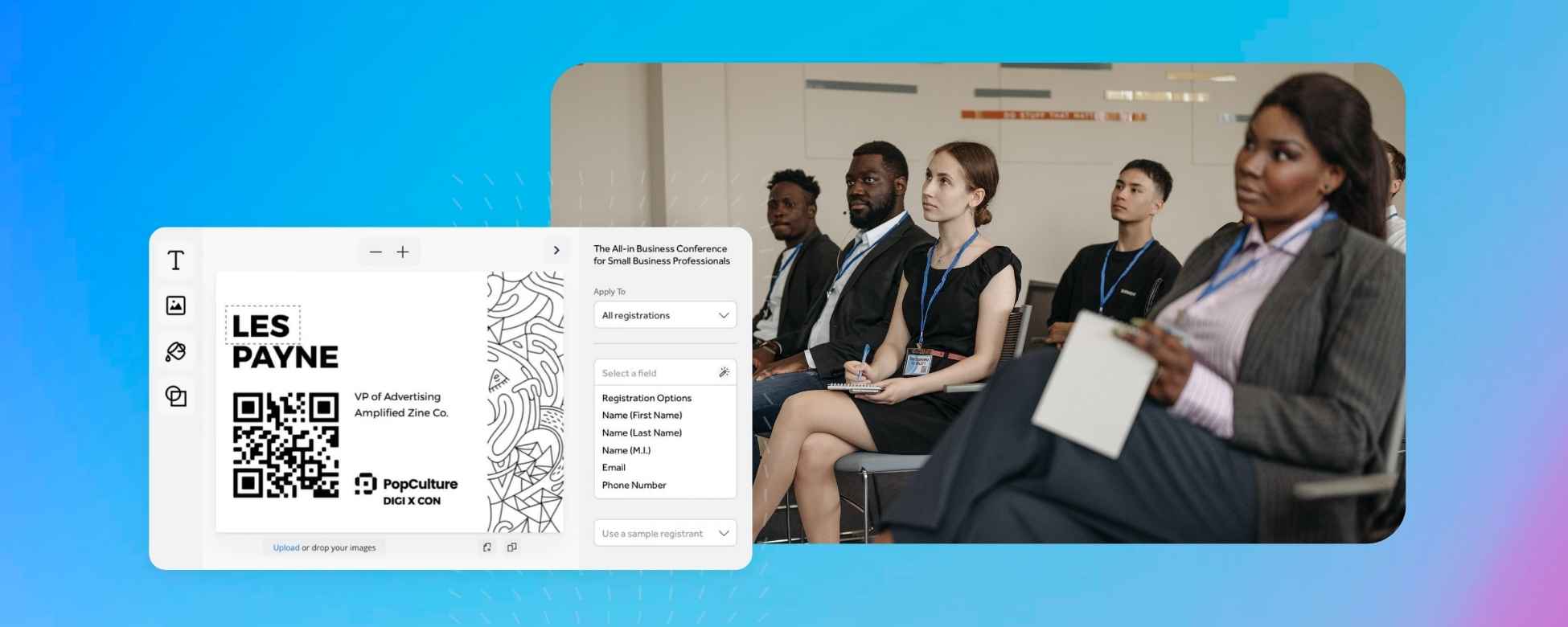
Badges may need to show different attendee details based on registration type, session tracks, company or affiliation, and sometimes QR codes for session scanning or lead retrieval. Look for a system that lets your team control badge fields and layouts without rebuilding them in a separate design tool.
RegFox includes a visual badge designer with custom fonts, graphics, sponsor logos, attendee fields, and different layouts for different registrant types.
3. On-Site Printing and Connectivity
Venue WiFi has a funny way of becoming unreliable exactly when you need it most.
Confirm what badge printing and check-in functions still work if connectivity drops, whether a local-network or offline option is available, and how data syncs once the connection returns.
4. Multi-Entrance and Multi-Device Support
For larger events with multiple check-in stations, badge printing should sync across every station in real time, so a badge printed at one entrance is reflected instantly at the others, and attendee data stays consistent.
RegFox’s check-in app syncs across multiple scanning devices and pulls in new online registrations throughout the event.
5. Speed at Volume
A badge station that takes 30 seconds per attendee turns into a long line fast. Ask how the system performs during peak check-in, not just in a demo with a handful of test records.
Look at the full workflow too: attendee lookup, check-in, badge printing, and last-minute edits all need to happen quickly when there is a line forming.
How Badge Printing Connects to the Rest of Your Event Workflow
Badge printing works best when it is part of the registration workflow rather than another system your team has to keep in sync.
Here’s what your workflow could look like with RegFox:
Registration collects attendee details and session selections.
↓
Payment stays connected to the registration record.
↓
Check-in confirms who actually arrives.
↓
Badge printing uses current attendee data to print badges on demand.
↓
Reporting gives your team registration and attendance data after the event.
RegFox connects registration, check-in, and badge printing through the same attendee database. Its built-in Event CRM automatically adds attendee and registration data, while reports and exports can include attendee details and check-in status.
Common Badge Printing Mistakes to Avoid
Badge printing problems usually come from small decisions made before event day. A few common ones:
• Printing all badges in advance. This sounds efficient until you factor in no-shows, name changes, late registrations, and walk-ups, all of which mean re-printing or hand-writing badges on-site anyway.
• Ignoring connectivity issues. Venue WiFi is not something you want to test for the first time when attendees are already in line. Know what your check-in and printing setup can handle if the connection gets spotty.
• Underestimating badge design needs. Session-based color coding, QR codes, and affiliation fields should be decided before event day, not while someone is standing at the printer.
• Splitting registration and badge data across separate systems. Every manual export, import, or sync creates another chance for attendee data to become outdated.
The simpler the setup, the better. Badge printing works best when it stays connected to the same registration and attendee data your team is already using.
The Bottom Line
Badge printing may look like a small line item in a vendor comparison, but it can have a big impact on the attendee experience. The best event badge printing setup connects directly to registration data, supports on-demand printing, stays synced across check-in devices, and gives teams enough customization to handle different attendee types without another disconnected system.
RegFox brings registration, multi-device check-in, and integrated badge printing together in one platform. Badges stay connected to the registrant database, can be printed individually or in bulk, and can be customized for different event and attendee needs.
Because when the doors open, your team should be welcoming attendees, not troubleshooting badge data.
Explore RegFox badge printing or create a free RegFox account to see how it works for your event.
The RegFox Team